
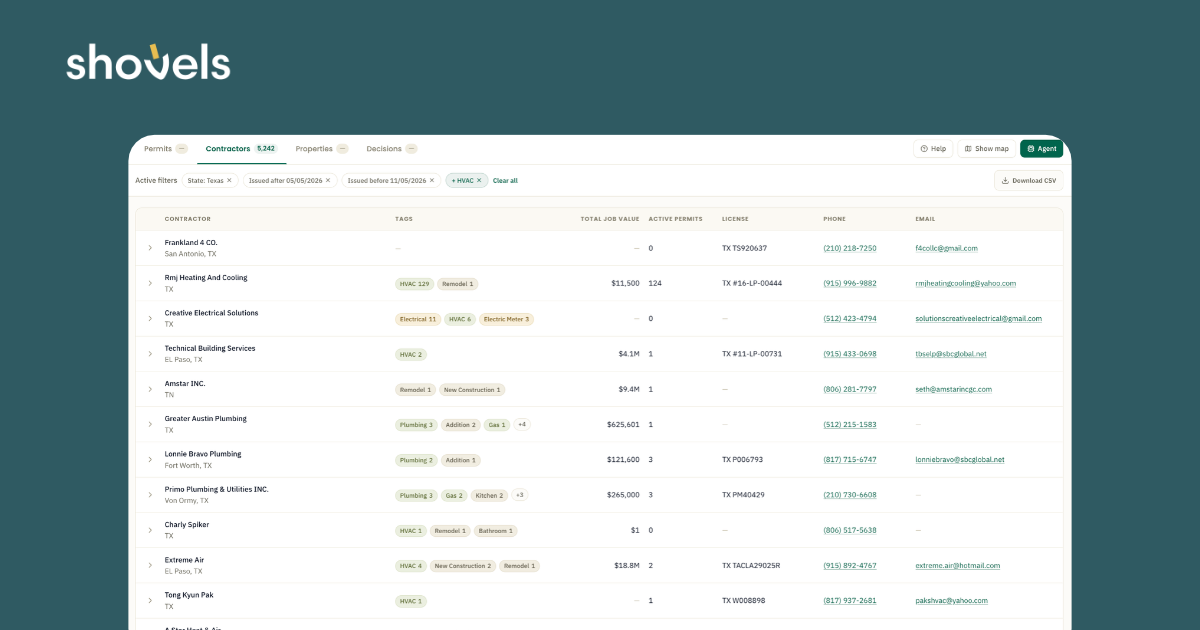

Two HVAC contractors can look nearly identical in a directory: the same license type, the same service area, and the same promise to handle heating and cooling. But one may replace residential systems every week, while the other focuses on a few large commercial projects. For an equipment supplier or distributor, those are very different prospects.
A useful HVAC contractor list makes those differences visible. It shows which businesses have recently filed permits, what kind of work they do, and how active they’ve been. While a license record shows qualifications, permit history offers evidence of recent demand.
This guide explains how to combine license and permit records, separate HVAC specialists from general contractors, and turn a metro ranking into a sales plan with examples of each step in Shovels.
Key takeaways
- Start with recent HVAC activity. Total permit volume alone can put general contractors ahead of the specialists you want to reach.
- Match the work to your product. Residential replacements, commercial installations, and heat pump projects call for different account lists.
- Compare contractors consistently. Use the same geography, date range, and permit-counting rules for every account.
- Combine volume with growth. A smaller contractor gaining work may deserve as much attention as an established market leader.
- Use permits as evidence, not a complete sales ledger. Service calls, exempt work, and projects outside your data coverage may be missing.
- Let Shovels do the grouping. Shovels links permits to contractor profiles, so you can rank contractors by HVAC work without stitching together local records.
Why permit data beats a purchased HVAC contractor list
A purchased HVAC contractor list can help you find companies to contact. But a business address and trade classification won’t tell you what installation work a contractor is doing or whether it fits what you sell.
Permit records add a dated history of projects linked to a business. Depending on the jurisdiction, they may include the contractor, project address, work description, filing and issue dates, permit status, and reported job value. These details help answer four questions:
- Activity: How many HVAC permits have been associated with this contractor in the past year?
- Project mix: Does the work involve residential replacements, new construction, commercial systems, or a particular equipment category?
- Territory: Where are the projects located (regardless of their home office)?
- Momentum: Is recorded activity increasing, holding steady, or declining?
| Source | Shows who exists | Shows recent activity | Shows project mix | Shows growth |
|---|---|---|---|---|
| State license boards | Yes | No | No | No |
| Directories / map listings | Yes | No | No | No |
| B2B contact databases | Yes | No | No | No |
| Permit data | Yes | Yes | Yes | Yes |
Pulling permits yourself means working through hundreds of local portals, each with its own format. Shovels standardizes permit records across jurisdictions and links each one to a contractor profile.
HVAC installations and replacements can leave a useful permit trail. San Diego, for example, includes air conditioner installations and furnace replacements in its simple mechanical permit process.
But remember that permit compliance for HVAC replacements varies widely. Some jurisdictions require permits even for like-for-like swaps, while in others, many replacements go unpermitted. The same contractor can look more or less active depending on local rules, so compare contractors within a market rather than across markets. Keep this in mind when reading the list.
The other thing to note is that permit volume measures recorded activity. It is not an exact count of completed jobs, equipment purchases, or revenue. A contractor with a large maintenance business may look less active than one focused on new installations. Use permits to find and compare prospects, then confirm each company’s business mix when you contact them.
For a broader approach to building a lead list, see our guide to construction leads from permit data.
Decide what makes a contractor a good prospect
Before creating a contractor ranking, define the ideal contractors you want to find.
A residential equipment distributor and a commercial controls supplier are looking for different leads. A heat pump manufacturer is probably looking for contractors already installing that equipment. Define the work you want to reach before ranking the businesses associated with it.
Next, turn that goal into a few clear filters: territory, property type, installation or replacement work, and relevant equipment descriptions or tags. If the available fields don’t distinguish the work you want, review a sample of permit descriptions to see what you’re missing.
In Shovels Online, these map to the Permit categories filter (HVAC, heat pump), Property type, and Description keywords, which searches the original permit text.
Often, permit descriptions will mention the equipment but not much else. For example, a description that mentions a heat pump may not tell you the equipment brand or who chose it. In cases like this, treat it as a starting point for qualification.
Equipment mix also varies by region. Cooling-only work dominates in much of the South, while full-system replacements are more common in the Midwest. Heat pumps are gaining share nationally. Our analysis of where Americans pull the most HVAC permits breaks this down by region and metro.
What an HVAC contractor record should include
A useful record answers three questions about each contractor:
- Who is this business? Name, license, and classification.
- What work does it do, and where? Recent HVAC permits, project mix, and service area.
- How do you reach it? Phone, email, and website.
Here’s how to build that record in Shovels Online. Each contractor record has two parts. The contractor profile lists the business and how to reach it. The permits linked to it show what work the business does and where.
Expand a contractor’s row in Shovels Online to see its license, classification, and HVAC permit count.
Review the contractor’s profile and permit history
After you search the Contractors tab for your territory (see the metro steps below), expand a contractor’s row to see its license status, classification, work types, and additional company details. The Work types section shows how many HVAC permits are associated with the contractor during your selected period.
Open the full contractor profile for more detail. It includes permit locations, activity by year, permit statuses, average project duration, and recent permits with their tags and property types.
The table below shows which fields to capture and where to find them.
| Field | Why it matters | Where to find it in Shovels Online |
|---|---|---|
| Business name and license number | Deduplicates contractors that file under slightly different names | Results row; full profile also shows license issue and expiration dates |
| License status | Flags expired, suspended, or revoked licenses for review before outreach | Expanded row, under Profile |
| Classification | Separates HVAC specialists from GCs, plumbers, and electricians | Expanded row shows the license classification and Shovels’ standardized ("Derived") classification; filter with Contractor classification |
| HVAC permits in your date range | The core ranking metric | Set the date range, then read the HVAC count under Work types in the expanded row |
| HVAC share of permits | Shows how focused the contractor is on HVAC | Divide the HVAC count under Work types by the row’s in-range permit total |
| Residential vs. commercial mix | Matches contractors to the right product line and rep | Filter by Property type; the full profile lists property type for each permit |
| Service area | Assigns contractors to branches and territories | Full profile maps every permit location |
| Average job value | Directional only, since many jurisdictions leave it blank | Expanded row and full profile |
| Phone, email, website | Makes the list usable for outreach | Results row; expanded row adds alternate phones and emails |
| Business type, employees, rating | Sizes and qualifies the account | Expanded row and full profile, when reported |
| Inspection pass rate | A quality signal for partner and dealer programs | Full profile; filter with Min inspection pass rate |
Check data availability before using the results
Not every field will be available for every contractor. Missing values appear as Not reported rather than zero, and Shovels Online flags low field coverage for your selected filters. Check these notices before drawing conclusions from incomplete records.
Treat secondary metrics as context rather than definitive measures. A permit’s reported job value describes the project, not the contractor’s revenue, and a building permit may cover work beyond HVAC. Inspection pass rates also depend on how many inspections were reported and how the local jurisdiction tracks them.
For API and data-feed users, the Shovels data dictionary lists the corresponding field names, including revenue ranges.
How to distinguish HVAC specialists from general contractors
Ranking contractors by total permits can put general contractors ahead of HVAC specialists. A general contractor may appear on hundreds of projects across multiple trades, while an HVAC specialist may have fewer permits, most involving heating and cooling.
To tell them apart, look at two things: license classification and HVAC share of permits. Classification identifies the contractor’s trade, while permit share shows how much of its recorded activity involves HVAC work.
Calculate HVAC share using the same territory and time period:
HVAC share = Unique HVAC permits ÷ All unique permits associated with the contractor
For example, a contractor with 180 HVAC permits out of 200 total has a 90% HVAC share. Another with 180 HVAC permits out of 900 has a 20% share. Both have the same HVAC volume, but the first appears more specialized.
Remember that a majority-HVAC threshold is a useful starting point, but it’s not a strict cutoff. A plumbing and HVAC business may fall below it and still be a strong prospect. Conversely, a contractor with two HVAC permits out of two total has a 100% share but little evidence of sustained activity.
For borderline accounts, check the license classification, website, and recent permit descriptions. Also pay attention to the contractor’s role: a permit may name the general contractor overseeing a project rather than the mechanical subcontractor performing the HVAC work. Don’t rely on business names alone, either. Companies with "Plumbing" or "Electric" in their names may also be active HVAC installers.
A simple example
The following figures are just an example, not actual contractor results. All counts cover the same territory and 12-month period.
| Illustrative account | HVAC permits | All permits | HVAC share | Prior-year HVAC permits | Initial interpretation |
|---|---|---|---|---|---|
| Contractor A | 240 | 260 | 92% | 220 | Established volume with a strong HVAC focus |
| Contractor B | 120 | 200 | 60% | 80 | Growing activity; review the broader trade mix |
| Contractor C | 160 | 800 | 20% | 150 | Substantial HVAC-associated activity; verify the business’s role |
| Contractor D | 24 | 25 | 96% | 8 | Potential specialist with a small but growing base |
Contractor C leads in total permits, but Contractor A leads in HVAC activity. Contractor B added 40 HVAC permits year over year, while Contractor D tripled its volume from a much smaller base.
These measures help narrow the list, but ultimately, product fit determines sales priority. A residential equipment supplier should look more closely at replacement work, while a commercial supplier may prioritize contractors handling larger installations.
Try this in Shovels: Shovels contractor profiles combine standardized classifications, permit activity by work type, license status, and contact information. Charlie, the Shovels AI agent, lets you query them in plain English and refine the results with follow-up questions.
In Shovels Online, open Agent and ask: “Top 50 HVAC contractors in Dallas-Fort Worth by HVAC permit count over the last 12 months, with active licenses and their share of permits that are HVAC.”
How to find the top HVAC contractors in a metro
Once you’ve defined your ideal contractor, you can build a ranked list for any metro using Shovels. The key is to apply the same filters and counting rules to every business.
Filter the Contractors tab to HVAC permits in your metro, then download the ranked list as a CSV.
1. Set your territory and time frame
Start with the cities, counties, or ZIP codes your sales team covers. Check which jurisdictions are included in your permit data, since coverage may vary across a metro. Shovels’ coverage dashboard can help you identify gaps. In Shovels Online, open the Contractors tab and set the area under Search in. A coverage note appears next to your filters when field coverage is low.
Use the last 12 months of permits for a current ranking. Choose filing dates to track applications or issue dates to track approved work, and apply the same definition across all contractors. Exclude canceled or withdrawn permits where appropriate.
2. Filter and rank contractors by HVAC activity
Filter for HVAC permits, then narrow by the property types and project categories that match your products. In Shovels Online, use Permit categories and Property type, then narrow further with Contractor classification, Min total permits, or Min inspection pass rate.
Group the results by contractor and rank them by unique HVAC permit count. In Shovels, the Contractors tab does this grouping for you, and each contractor has a persistent Shovels ID. To rank by HVAC count, ask Charlie, or download the CSV and sort. If you’re combining permit data from other sources, make sure the same permit isn’t counted twice.
Decide whether to rank individual branches and brands or their parent companies. In the Shovels API and data feed, contractor_group_id links related businesses.
3. Compare activity and growth
Start with HVAC permit volume, then compare each contractor’s latest 12 months with the preceding 12 months.
Look at both the percentage change and the number of permits gained or lost. A contractor growing from 80 to 120 permits may be a stronger prospect than one growing from 8 to 16, depending on your sales goals.
Use comparable data coverage across both periods and account for seasonal patterns before interpreting changes as growth or decline. In Shovels Online, run the same search for each date range or check the By year chart on a contractor’s full profile.
4. Prioritize contractors for outreach
Use product fit, permit volume, and growth to divide your list into three tiers:
- Tier 1: High-volume contractors with strong product fit. Prioritize for direct sales outreach.
- Tier 2: Contractors with moderate volume or meaningful growth. Qualify through inside sales.
- Tier 3: Smaller or less clearly matched accounts. Keep them on your list for future outreach.
Adjust the thresholds to your territory and sales capacity. A top contractor in a smaller metro may have far fewer permits than one in a major market.
5. Export your list and assign accounts
In Shovels Online, click Download CSV, then import the ranked contractors into your CRM with their territory, relevant permit counts, growth, priority tier, and last refresh date. Use stable contractor IDs to avoid creating duplicate accounts.
Give sales reps a brief reason for each account’s ranking. For example: "Residential HVAC replacement permits increased from 80 to 120 over the past year."
That context turns a contractor list into a starting point for outreach.
Turn the ranking into better sales conversations
Give each priority account a clear reason for being on the list. A contractor doing more residential replacements may be worth a conversation about inventory or delivery coverage. One taking on more commercial projects may need a different product line or specialist support.
Use those signals to ask better questions. Permit history won’t tell you who supplies the contractor or whether they want to switch, but it can help a rep prepare. Include existing customers, too, so you can spot changes in their work or territory. Before acting on a decline, check for seasonality, reporting delays, or changes in data coverage.
Boldr, for example, used Shovels contractor data to find installers with mini-split experience when building its partner network.
Snapshot or regularly updated list?
Match the refresh schedule to how the list will be used.
A territory plan can start with a dated snapshot. For active prospecting, update the list regularly to find new accounts and spot changing priorities. Account-based programs may update tiers quarterly and review key accounts more often.
Time updates to match the data source. Shovels’ contractor directory says its contractor data is refreshed and reprocessed monthly. Confirm the schedule for the product or feed you use; not every field necessarily updates at the same time.
Save each snapshot so you can see what changed. Once updates become routine, use the Shovels Google Sheets add-on or the Shovels API to make the process repeatable, or read our API and Clay guide.
Use the same method for other trades
The approach also works for roofing, electrical, plumbing, and solar accounts. Change the work category and product-fit criteria, then follow the same steps. A roofing supplier may separate reroofs from new construction; an electrical supplier may isolate panel upgrades or EV charger installations. Match the filter to the work your product supports. In Shovels, swap the HVAC permit category for roofing, electrical, plumbing, or solar.
See the top HVAC contractors in your territory today. Start free in Shovels Online and ask Charlie for the top HVAC contractors in your metro. Or, if you need national contractor data in your warehouse, talk to our team.
Frequently Asked Questions
- Where can I get a list of HVAC contractors?
-
State licensing boards and business directories can help you find licensed HVAC contractors, but they don’t show who is actively filing permits. Permit data can rank contractors by recent filings. Shovels links permits to contractor profiles with license status, classification, and contact details. The free Shovels contractor directory lets you browse by trade and location.
- How do I find the top HVAC contractors in my area?
-
Pull HVAC permits for your metro from the last 12 months, group them by contractor, and rank by permit count. Flag inactive or expired licenses for review. Check what share of each contractor’s permits involve HVAC so general contractors don’t crowd the top of the list. In Shovels Online, filter the Contractors tab to HVAC permits in your metro, or ask Charlie for a ranked list.
- What is the difference between an HVAC contractor database and a permit-based list?
-
A database lists contractors. A permit-based list adds recent work, service locations, and changes in activity. Refreshing it with new permits helps keep it current.
- Does a contractor with many permits mean they are a general contractor?
-
Not necessarily. A high permit count across many trades may indicate a general contractor or remodeler. Check the contractor’s classification and the share of permits involving HVAC to identify specialists.
- How often should I refresh an HVAC contractor list?
-
For active sales outreach, refresh the list regularly so new and growing contractors are included. A single snapshot may be enough for territory planning. Quarterly updates can work well for account-based programs. Shovels refreshes contractor data monthly.
- Do permit records include HVAC contractor phone numbers?
-
Permits name the contractor of record and often the license number. Shovels adds phone numbers, emails, and websites to contractor profiles, drawn from permit applications and other sources.
- What is an HVAC contractor?
-
An HVAC contractor is a licensed business that installs, replaces, and services heating, ventilation, and air conditioning systems. Most states license HVAC work as mechanical or air conditioning contracting, and most installations and replacements require a mechanical permit, which is why HVAC contractors show up clearly in permit data.
- How many HVAC companies are there in the US?
-
Industry estimates put the number of US heating and air conditioning contractors in the six figures, but license counts overstate the active market. Many licenses belong to inactive, retired, or very small businesses. Shovels tracks HVAC contractors through both license records and permit filings, so you can narrow the count to companies that have actually filed HVAC work recently in your territory.