
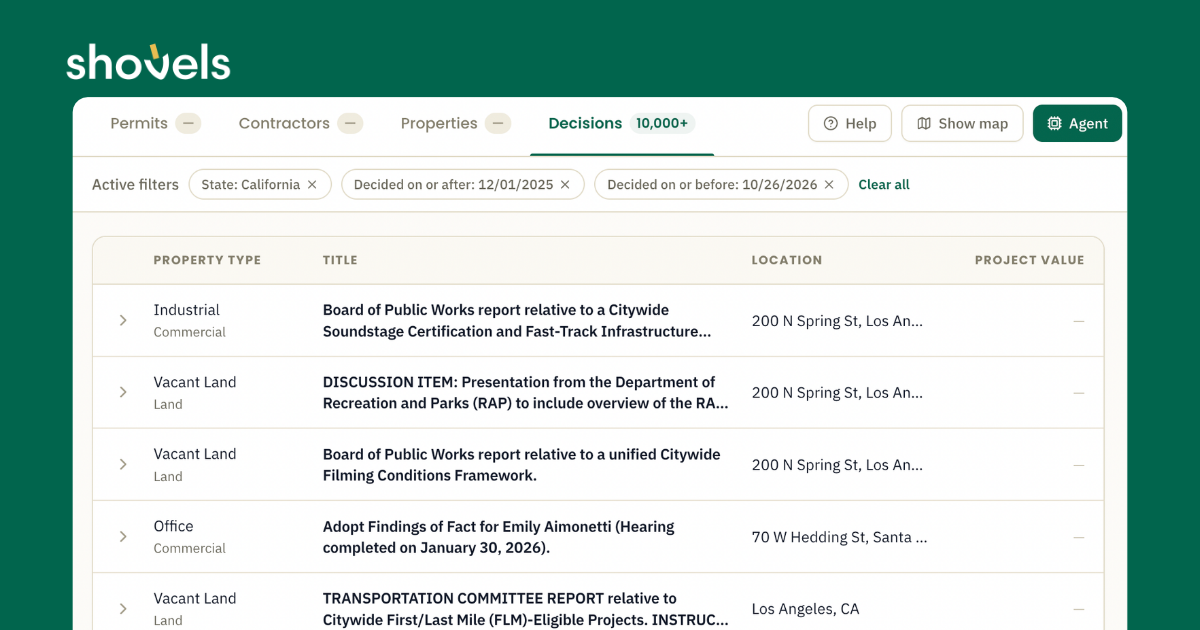

The Shovels Decisions beta launched through our API earlier this year, bringing together zoning approvals, rezonings, demolitions, environmental reviews, and planning commission actions extracted from official agendas and meeting minutes across hundreds of jurisdictions (city, county, school districts, towns, etc).
Now Decisions is searchable in Shovels Online, making early-stage intelligence accessible without writing code. While we continually expand coverage, Decisions currently stands at:
- ~3K jurisdictions
- ~500K meetings
- ~1M decisions
- Jurisdiction freshness: <1 day (23%), 1-7 days (57%), 7-30 days (19%)
What makes Decisions valuable is timing. Permits are often filed after other milestones for any development project - such as zoning, approvals, and financing, to name a few. Decisions helps to enhance the insights from permits by offering an earlier signal to development, often months before construction reaches the permitting stage. This helps our customers paint a fuller picture of the complete cycle of development.
What you can do in the Decisions tab
Decisions sits alongside Permits, Contractors, and Properties as its own tab in Shovels Online. Each tab keeps its own filters and results, so you can switch between datasets without losing your search.
Search by location and date. Pick an address, city, county, state, or jurisdiction, and a decision date range. New searches start with the last 12 months. ZIP code search is not supported for Decisions.
Narrow by what was decided. Filter by category and subcategory, such as rezonings and variances, by asset class (residential, commercial, mixed-use), and by property type. Category and subcategory tags keep the same color in filters, results, and details, so you can scan a list quickly.
Filter by keyword and project value. Search the decision text by keyword, and set a minimum or maximum project value to focus on projects of a certain size.
See the full record. Open any decision to see:
- Decision: date, category, subcategory, and asset class
- Project: property type, project value, lot size, previous and new zoning, and allowed uses
- People: applicant, owner, representative, and developer
- Location: the address, with a map when coordinates are available
- Source: a link to the official meeting record the decision came from
Every decision also has its own page you can share with your team.
Access. The Decisions tab is available on Free and Pro plans, with the same result limits as the other tabs. For bulk access, use the Shovels API or contact sales about an enterprise data license. Field definitions are in the data dictionary.