


If you've ever dug into the Shovels data dictionary, you've probably noticed a column called Source (column E). It's a small field, but it carries a lot of meaning. Once you understand it, you'll have a much clearer picture of the data you're working with and how much to rely on any given field.
What Is the "Source" Field in Shovels Data?
The Source field is a label attached to every field in the Shovels dataset. It tells you two things: where the data comes from and how much Shovels modified it before it reached you.
Every field is assigned one of three values: Provided by jurisdiction, Enhanced by Shovels, or Created by Shovels. Together, these three categories map the full journey of a data point from a record in a municipal system, through Shovels processing and enriching it, to new intelligence, generated by our models, that isn't provided in the original document.
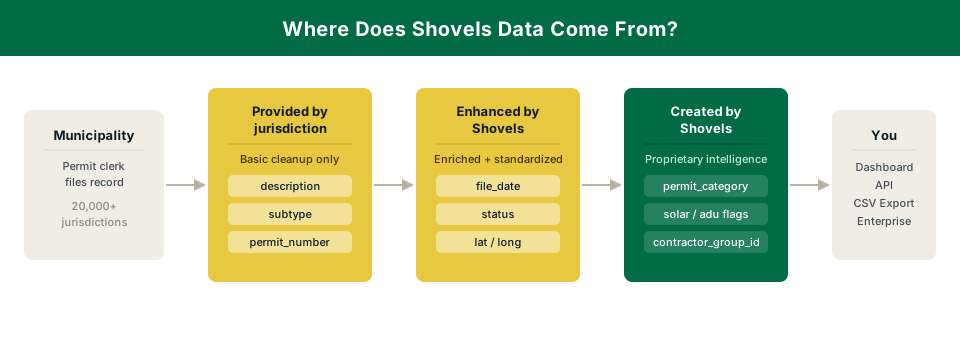
This matters because not all fields are created equal. Here's a detailed breakdown of the differences by category.
Source Is: Provided by Jurisdiction
This is the originating layer, the data that comes directly from the municipality and forms the foundation of every permit record in Shovels. Fields labeled "Provided by jurisdiction" are the values the jurisdiction recorded, delivered to you with only basic data quality cleanup. We don't alter the substance of what was captured.
Example: The description field. This is whatever the permit applicant wrote when they filed. In one jurisdiction it might say "Reroof - asphalt shingles." In another it might say "RTF." Both are "Provided by jurisdiction."
Other fields in this category include permit_number, type, subtype, and applicant and owner contact details as recorded on the permit itself.
The upside of this category is that you're working with primary source data. The thing to keep in mind is that these fields reflect the full range of quality across 20,000+ local governments. That variation is a feature of the underlying data, not something Shovels has introduced.
Source Is: Enhanced by Shovels
This is where we start adding value on top of the data we receive from various jurisdictions. "Enhanced" fields start with something the jurisdiction gave us, but we've improved, standardized, or enriched them using our own methods or third-party data partners.
Enhancement can happen in two ways:
In-house methods — We process and enhance the data through our own methods. Geocoding is a good example. Jurisdictions often provide addresses, but rarely in a clean, mappable format. We attach specific geographic identifiers like latitude and longitude to the addresses we receive. The original address comes from the jurisdiction, and the clean, geocoded version comes from in-house enhancement.
Examples: The census_tract, latitude, and longitude fields. Jurisdictions don't give us census tracts. We derive them.
Third-party data partners — Some enrichment comes from external sources we've integrated into our pipeline. For example, data enriched through tax assessor data allows us to attach property-level details like lot size, building square footage, and an assessed market value to a permit record. The permit is the anchor, and the property data is the enhancement.
Example: The property_type field, pulled from third party tax assessor files. The permit tells us work was done, while the tax assessor record tells us what kind of property it is.
A note on property data: Because tax assessor files update less frequently (sometimes only once or twice a year) and permits update in real time, there can be lag. The tax assessor might label a property as "industrial" even though a new permit was pulled on that property to convert it to a multi-story residential apartment building. It's not a bug, but the nature of combining two different data streams.
Source Is: Created by Shovels
This is pure Shovels IP and refers to fields that didn't exist anywhere before we built them. These are derived entirely from our own models, logic, and engineering work.
The best examples are our Permit Categories (listed here in the data dictionary). The jurisdictions do not classify "solar permit" or "ADU permit" in consistent ways. What they give us is a non-standardized description, maybe a type code, maybe a subtype. We trained AI models on those three fields to classify permits into standardized categories — solar, adu, new_construction, and so on. We added the boolean flags. You can read more about those here.
Another example is contractor-level aggregations and the linked contractor_group_id. These IDs let you group permits across jurisdictions under the same business. Jurisdictions each have their own contractor records, and we connect them to create a unified view.
Why This Matters
Knowing the source of a field changes how you should use it and what level of confidence you can have in it.
If a field is Provided by jurisdiction, the values come directly from municipal records. Shovels ensures the data is standardized, that the values are formatted and clean. But, we make minimal changes to the substance of what's recorded. With so many permitting authorities across the US, some variation in fields like description or subtype is to be expected.
If a field is Enhanced by Shovels, know that we've added a processing step. We've worked actively to improve quality and usability, but there might still be edge cases. This can occur especially where our source data (like tax assessor data) has its own update cadence.
If a field is Created by Shovels, you're working with our proprietary intelligence layer. These fields are designed to help you answer questions that data from municipal records alone couldn't. Questions like: Is this a new build or a remodel? Is this contractor active in solar? How many ADUs went up in this ZIP code last quarter?
We built the Source column because we believe data transparency is foundational to trust. You deserve to know whether you're looking at something a permit clerk typed, something we geocoded, or something our models inferred. The answer shapes how you interpret the data and how you build with it.
Want to explore the full data dictionary? Find it here. And, if you're ready to dig into the data yourself, start with a free Shovels account or reach out to our team.
Frequently Asked Questions
What is the Source column in the Shovels data dictionary?
The Source column tells you where each field in the Shovels dataset came from and how much Shovels processed it before it reached you. Every field is labeled one of three ways: Provided by jurisdiction, Enhanced by Shovels, or Created by Shovels.
Why do some fields have missing or inconsistent values?
Fields labeled "Provided by jurisdiction" are passed through almost exactly as the local government recorded them. With over 20,000 permitting authorities across the US, formatting, completeness, and naming conventions vary widely. The inconsistencies reflect variations in the underlying data.
How often is enhanced data updated?
It depends on the source. Geocoded fields like latitude, longitude, and census tract update in close to real time alongside permit records. Fields derived from tax assessor files, like property type or lot size, update on the assessor's own schedule, which is typically once or twice a year. The Source field helps you know which type you're working with.
What are Shovels' permit categories and how are they generated?
Permit categories like solar, adu, and new_construction are created by Shovels. They don't come from jurisdictions. We trained AI models on permit descriptions, type codes, and subtypes to classify permits into standardized categories consistently across all jurisdictions. You can see the full category list in the data dictionary.
Can I see the source for a specific field?
Yes. Column E of the Shovels data dictionary lists the Source value for every field across permits, contractors, and properties.