


For companies selling to contractors, such as lenders, SaaS providers, and building materials and equipment suppliers, finding reliable, timely leads can be a constant challenge. Many rely on buying brokered lists, scraping directories, or subscribing to lead platforms that promise quality but frequently struggle to deliver.
When these lead sourcing methods fail, it's usually because of poor data quality. B2B contact data decays at approximately 22–30% per year, according to industry research from Cognism and ZoomInfo. A list sourced six months ago may already be 15% inaccurate before the first outreach campaign launches.
Contact lists also offer only a narrow view of the contractors you're targeting. A business name and short description won't tell you whether they're actively building, what types of projects they take on, or whether the timing is right to connect. Fortunately, construction permit data can fill in where other sources fall short.
Why "Trigger-Based" Lead Generation Performs Better
If you still rely on cold outreach with static lists, we recommend switching to trigger-based lead generation. Trigger-based lead generation initiates outreach automatically in response to a real-world event that signals a prospect is actively in-market and ready to engage.
In construction, the clearest trigger event is the filing of a building permit. Before a contractor shows up in a directory or an association roster, they file a permit with the local municipality. That public record confirms the project type, estimated value, and contractor of record. Permit statuses can also reveal whether work is underway, whether budgets are committed, and whether procurement decisions may already be in motion.
Think of a building permit as the buyer intent signal. Unlike a form fill or a content download, a permit record contains the who (the contractor), the what (permit type and scope), the when (filing and approval dates), and often the why (the investment decision behind it).
This guide helps construction suppliers, SaaS providers, home improvement companies, and other firms take advantage of the rich signals available in permit data by building a trigger-based contractor lead system using Shovels. We cover how to search and filter our permit and contractor data, how to manage the full permit lifecycle from early signals to post-project follow-up, and how to turn permit events into timely, context-rich outreach that lands when it matters.
What Building Permit Data Contains
Before building your lead workflow, it's helpful to get familiar with what Shovels permit data includes. Permit records in Shovels include some or all of the following core fields, depending on what the originating jurisdiction captures and publishes:
- Property address — this is precise to the street address and parcel identifier.
- Permit type — this is the category of work being performed: roofing, electrical, plumbing, HVAC, framing, solar, EV charger, ADU, new construction, demolition, and other trade-specific categories.
- Job value — this is self-reported by the applicant at the time of filing. This field is useful as a directional filter, but since it's frequently underreported, treat it as a range or directional indicator rather than a precise figure.
- File date — this specifies when the permit application was submitted.
- Permit status — this indicates whether the permit has received municipal approval and where it is in the inspection lifecycle (final, in review, inactive, or active).
- Contractor of record — this is the licensed contractor responsible for the work, including their state license number.
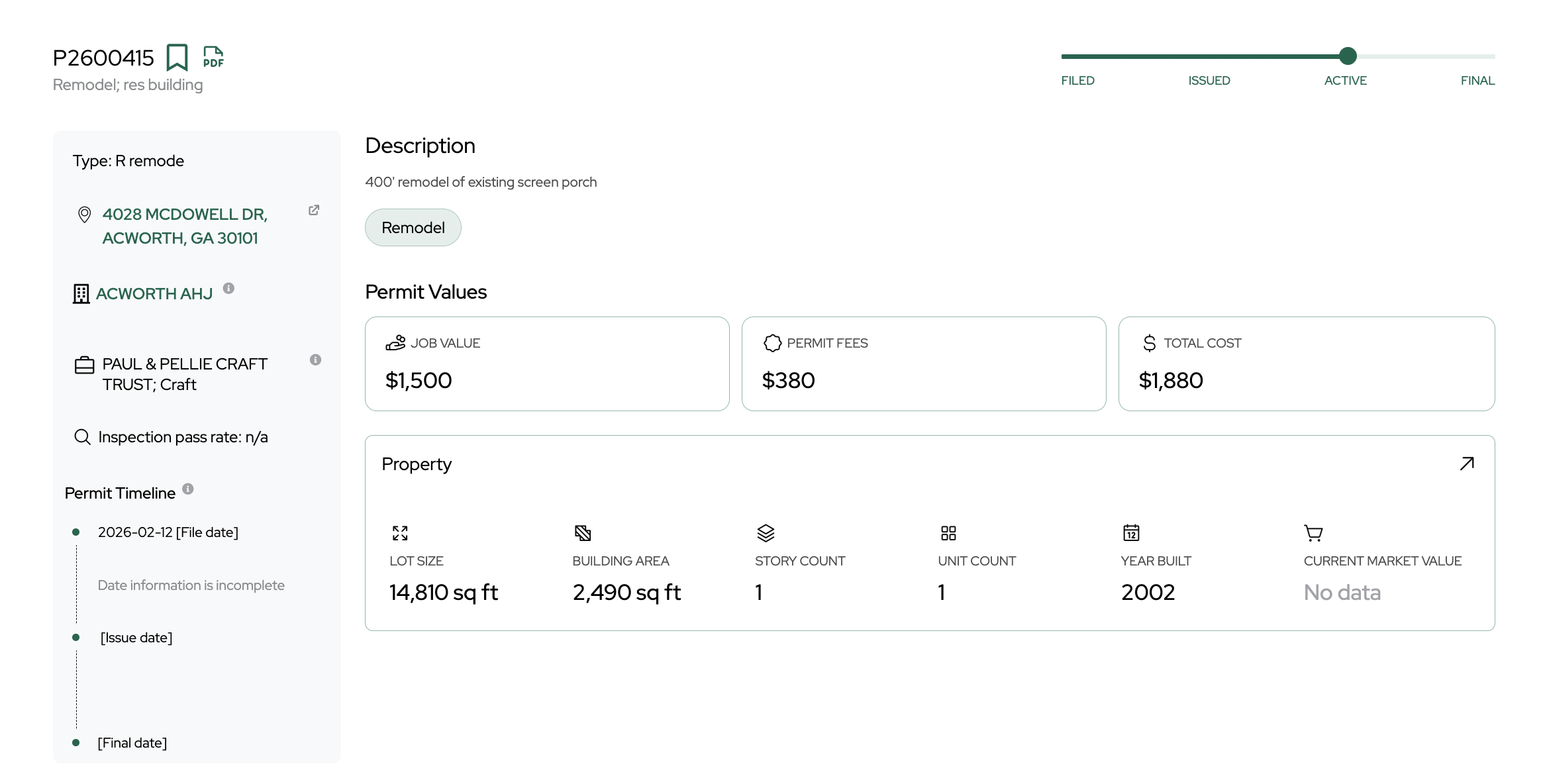
Some contractor fields, such as business name and license number, are pulled directly from the permit itself. Others, including contact information like telephone, email, years in business, and historical permit volume, are enriched by Shovels from additional sources. Together, these layers give you the trigger event, the project context, and the contact details needed to reach out at exactly the right moment.
You can learn more about how our data is sourced here. To see what fields we currently offer, consult the Shovels data dictionary.
Did you know: the U.S. has over 20,000 permitting authorities, including cities, counties, townships, and special districts. Each has its own filing format and publication schedule. Shovels normalizes records across jurisdictions and standardizes permit type classifications, making building permits easy to search.
How to Filter and Target Contractors Before Prospecting
Shovels enables contractor classification across five categories: permit type, activity level, job value, location, and permit status. Filtering in advance helps you reduce manual qualification before a single lead reaches your team.
Once you're ready to start exploring, begin by defining your ideal customer profile and translating it into clear, filterable criteria. This step is quick to complete but significantly improves lead quality. For example, you might target "licensed roofing contractors in Texas who have pulled at least three roofing permits in the past 30 days."
When you've done this, here's how to find your ICP using direct filters in Shovels:
1. Filter by Permit Type
Shovels categorizes every permit by the type of work being performed: roofing, electrical, plumbing, HVAC, framing, solar, EV charger installation, ADU construction, new residential construction, commercial tenant improvement, and more.
For most B2B vendors and companies, the target ICP will map directly to one or several of these categories. A roofing materials supplier targets contractors who pull roofing permits. An equipment rental company targets general contractors on large-value new construction permits. A solar financing provider targets contractors who specialize in solar installations. Filtering by type at the outset removes irrelevant records before they reach your team.
2. Look at Activity Level
A state contractor license database lists every active license holder, whether they're currently working or not. Many licensed contractors have not pulled a permit in six months or more.
Permit recency and frequency are your top signals for current activity. Active contractors typically pull multiple permits within a rolling 30–90 day window. Those with no recent permit activity may have exited the market, narrowed their focus, or shifted to non-permitted work. Prioritizing contractors with at least one permit in the past 60 days materially improves lead quality before any enrichment.
3. Keep an Eye on Job Value, But Be Cautious
Shovels permit records include a job value field that allows prospect segmentation by project value estimation. This can be useful, as vendors for large commercial projects and suppliers for residential renovation are targeting very different contractor segments.
But, job value comes with an important caveat: project valuations on permit applications are often self-reported. They're also frequently underreported. For now, we suggest using job value as a directional filter for excluding very low-ticket permits (minor repairs, cosmetic alterations). We're actively working on using entity extraction to model job value, so stay tuned for updates.
4. Filter for the Right Jurisdictions or Regions
Because permits are filed at the local jurisdiction level, geographic filtering is highly granular. You can easily retrieve permits by type within a specific city, ZIP code, jurisdiction, or county over a set period.
For sales teams, this can mean clean territory-level lists. For national organizations, it allows market prioritization based on where construction activity is concentrated or accelerating, all fields you can query directly in the Shovels dashboard or API.
5. Always Look at Permit Status
Permit status shows where a project sits in the municipal approval and construction lifecycle. It's an often underused but powerful signal. For Shovels especially, status is a first-class filter. Learn more about how we define permit statuses in our status 101 blog. Here's what each stage means for your outreach timing:
- In Review — The application is actively being assessed by the municipality. The project is real and moving through the approval process. This is a good moment for early relationship-building before work is authorized.
- Active — The permit has been approved and work is underway. This is the key intent stage for most outreach: funding is secured, work is mobilizing, and procurement is underway.
- Inactive — The permit was issued but work was not completed. This indicates a funded, approved project that stalled, suggesting a warm lead. Outreach that addresses financing, materials, or scheduling challenges may outperform standard cold prospecting.
- Final — The project is complete and has passed inspection. These permits signal opportunities for maintenance contracts, warranties, equipment replacement, and upsells. This is a distinct lead category worth running as a separate workflow.
The Contractor Lead Workflow, Step-by-Step
Once you've applied the right filters for your ICP, you can use a repeatable workflow in Shovels to turn your criteria into qualified, CRM-ready leads.
Step 1 — Pull a Filtered Permit Dataset
Pull your filtered dataset directly from Shovels. We offer multiple access options depending on your team's workflow: Shovels Online for ad hoc exploration and list building, the Shovels API for automated pipelines, and the Enterprise Data License for bulk data shares and large-scale use cases. All three expose the same underlying data, choose based on how your team operates.
As a starting point, use a 30-day lookback with recency filters. Teams with longer sales cycles or targeting less active trades may prefer a 60–90 day window for sufficient volume.
Step 2 — Aggregate and Deduplicate by Contractor
Multiple permits are often tied to the same contractor. Instead of treating each permit as a separate lead, aggregate records at the contractor level using license number or Shovels' contractor ID, then rank by permit frequency. A contractor pulling 12 permits in 30 days represents a very different opportunity than 12 contractors who have each pulled one.
Feature Highlight: Shovels maintains contractor group IDs that consolidate related entities at the state level, relevant for understanding whether a prospect is operating as part of a larger organization.
Step 3 — Review Inactive Permits
Before enrichment, run a targeted check for stalled or expired permits. Shovels lets you filter for expired or long-stalled permits by the "inactive" status and date range. A permit approved 18 months ago that never reached "final" status signals a funded, authorized project that was never completed.
If your offering helps move projects across the finish line, consider outreach to these contacts. These leads are often more receptive than typical cold prospects.
Step 4 — Enrich with Contact Data
For contact enrichment, appending verified email addresses, phone numbers, and business details, we recommend connecting your Shovels API to Clay. This way, you can access building permit data, contractor information, and property owner details, enriched and organized within Clay's no-code platform.
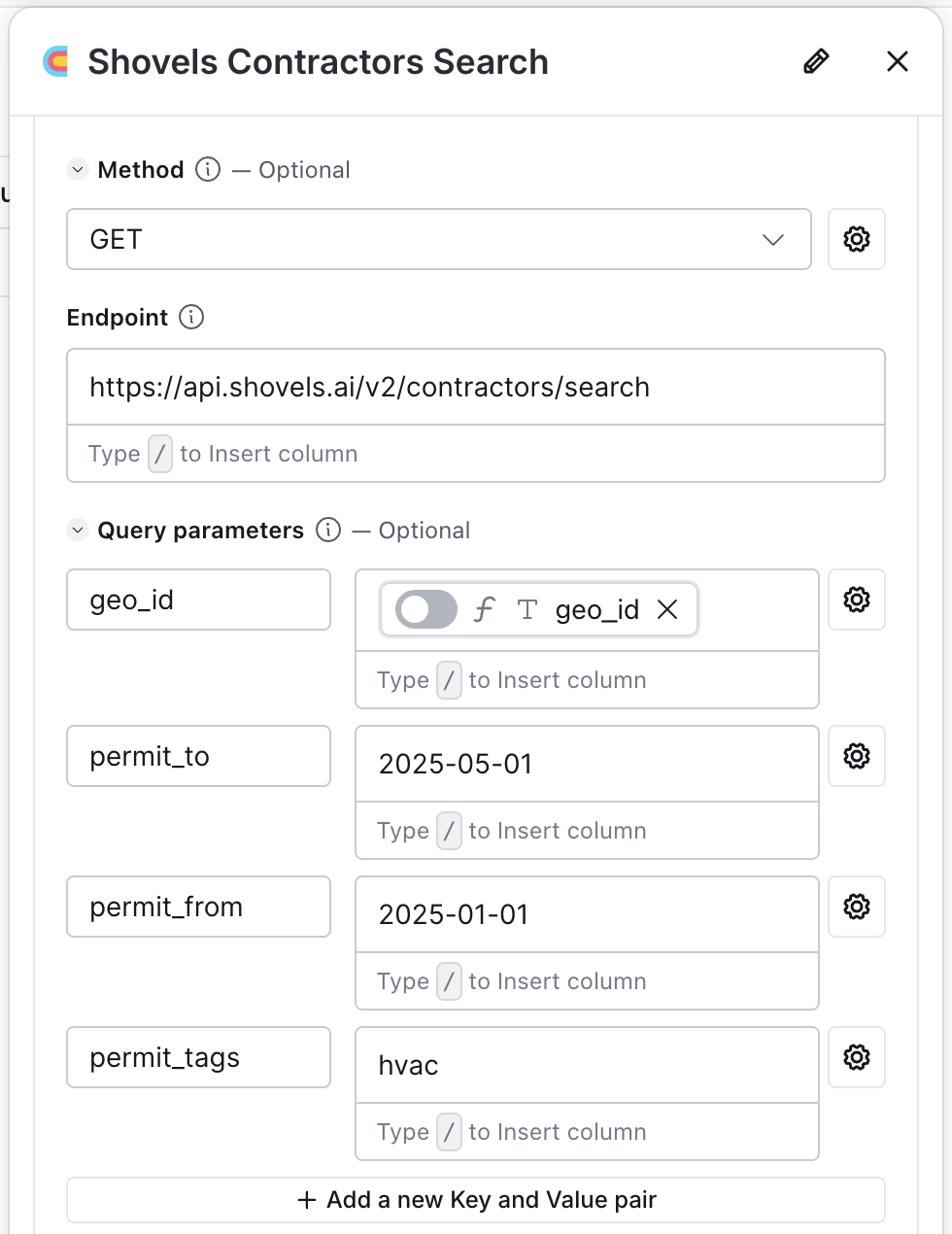
You can pull up the contractors you're looking for and easily build profiles for outreach
We have a published integration that connects Shovels permit and contractor data directly to Clay's enrichment waterfall. See our full walkthrough here.
Step 5 — Segment and Prioritize
Before initiating outreach, divide the enriched list into tiers based on activity level, job value (if using), and contact verification status. A practical three-tier structure looks like this:
- Tier 1 — Active (3+ permits in the past 30 days), high-value projects, fully verified contact information
- Tier 2 — Active, lower project value or partial contact data
- Tier 3 — Moderate recent activity, suitable for lower-frequency nurture sequences
Your tiers should map directly onto your outreach investment. Tier 1 contacts might receive a full multi-touch personalized sequence while tier 3 contacts might receive a lighter cadence with fewer touch points.
Step 6 — Execute Outreach with Project Context
After tiering your list, export it from Shovels to your CRM or outreach platform and you're ready to begin execution. Customers have used tools like Zapier and n8n to automate this step, feeding Shovels data directly into their CRM without manual exports.
Because permit data includes project details, permit type, job value, location, and status, you can personalize outreach by referencing the specific project. Even a brief mention of project type or location can set your message apart from generic cold emails.
Keep messages short with one clear call to action, and send them from an individual email address rather than a generic alias. Use multi-channel sequences (email, phone, LinkedIn) instead of one-off blasts, and limit segments to fewer than 100 contacts to preserve personalization. In construction sales, plan for 6–8 touch points before receiving a meaningful response.
Bonus Tip: Use Decision Data for Upstream Lead Signals
Building permits are a strong signal of intent, but some companies might need an earlier signal. Before a permit is filed, most projects pass through municipal processes: zoning board hearings, variance applications, and city council approvals. Shovels recently acquired ReZone, a platform that aggregates government decision records. We're actively connecting decision data to permits filed on those same properties.
With an expanded platform comprising both permit and decisions data, users will be able to identify a project weeks or months before a permit is filed, finding an optimal entry point for suppliers seeking early specification, lenders building relationships before capitalization, and any vendor who benefits from early action.
Decision data from Shovels is currently available via daily email digest and dashboard, with current coverage across 100 priority cities. Contact us to learn more.
Permits as Recurring Trigger Events: A Reliable Lead Generation Engine
The real power of permit data is that it runs continuously. Rather than one-off list pulls, you can build a lead generation system that refreshes automatically on a schedule — surfacing new permits as they're filed, with no manual exports and no missed timing windows.
The Shovels API supports automated pipelines directly. You define the logic once — permit type, location, status, contractor activity threshold — and query against it on a recurring basis. Most teams using Clay do this with a weekly poll: each run checks for new permits matching their criteria since the last check, then pushes net-new contractors into their enrichment and outreach sequence via tools like Zapier or n8n, with no custom engineering required.
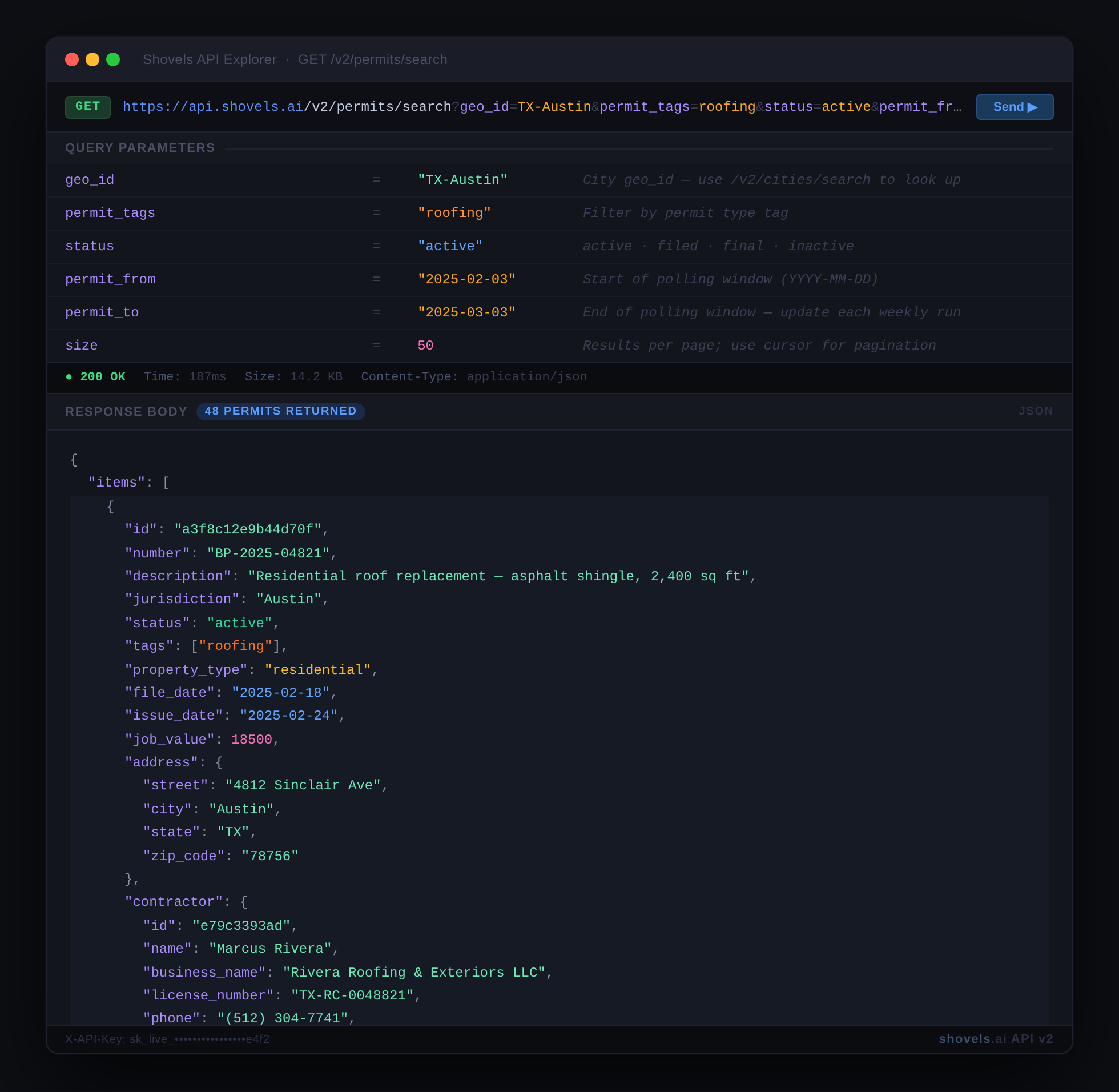
Most teams using Clay, for example, do this by setting up a recurring weekly poll: each run queries for new permits matching their criteria since the last check, then pushes net-new contractors into their enrichment and outreach sequence.
Here are a few examples of how this looks in practice by vertical:
- A roofing permit filing is a signal for solar installation outreach. A homeowner who just replaced their roof has a fresh surface and has demonstrated willingness to invest in the property. This is a strong solar candidate.
- A large new construction permit approval can be a signal for lender outreach. A general contractor with a substantial project in motion has active pipeline and near-term capital needs.
- An HVAC permit on record from 5+ years ago may be a lead for maintenance or service contract outreach, while one from 15+ years ago may be a lead for equipment replacement outreach.
- An EV charger permit filing could trigger an electrical supplier or panel upgrade outreach. A property owner investing in EV infrastructure frequently signals demand for related electrical work.
Once your sequence is up and running, your lead generation operates continuously, refreshing with real, up-to-date construction activity.
Who Uses Contractor Lead Data, and How
Permit-based lead generation with Shovels serves a range of verticals. Here's how the targeting logic and use cases differ by industry:
Business Lenders and Fintech
Contractors with consistent permit volume are well-qualified candidates for capital loans, equipment financing, and business lines of credit. In Shovels, active permit frequency is a reliable proxy for cash flow: a contractor pulling 10 or more permits per month has consistent project revenue and recurring financing needs. Shovels surfaces these prospects at the point of growth, before they're actively soliciting financing proposals and before competitors are in the conversation.
Building Materials and Product Suppliers
For building materials and building products suppliers, contractor lead classification is the core of the workflow. Permits let you sort contractors into meaningful categories: who installs the products you sell, at what volume, and how recently. Permit type maps directly to product requirements: roofing permits indicate demand for shingles, underlayment, and flashing while new construction permits indicate demand for concrete, dimensional lumber, trusses, and interior finish materials. Solar permits indicate demand for racking systems and inverters. Filtering by this category effectively pre-qualifies the list.
Equipment Rental Companies
Active construction permits indicate job sites with ongoing equipment demand. Equipment rental companies can use Shovels to identify high-value new construction and major renovation projects within their service radius, and initiate contact with general contractors before equipment sourcing decisions are finalized. Teams with API access can build automated systems that surface new equipment opportunities tied to freshly approved permits in real time.
Construction SaaS and Professional Services
Software and service providers targeting contractors can use permit volume as a reliable growth signal. A contractor whose permit count has increased year-over-year is scaling operations and more likely to seek out tools that support this growth. Shovels data supports an analysis of permit activity by contractor and growth-based targeting.
Start Building Your Contractor Lead System With Shovels
Most contractors don't fill out inbound forms or respond well to cold outreach without context. But they do file building permits. Permit records carry everything you need to reach them at the right moment: who they are, what they're building, where, and what stage the project is currently at.
Leading vendors are building trigger-based systems that activate the moment the right permit is filed. Shovels is designed to power exactly that workflow.
Shovels covers 185M+ permits and 3.3M+ contractors across 85% of the US population, updated continuously. Permit types are normalized across all jurisdictions so your filters are consistent everywhere. The full dataset is accessible via Shovels Online, the Shovels API, or the Enterprise Data License, whatever best fits your stack.
We provide extensive coverage, freshness, data normalization, and contractor linkage. Together, they create a measurable advantage for reaching contractors at the right moment. If you're interested in building your contractor lead engine with Shovels, contact us to talk through your use case.
Frequently Asked Questions
What is a construction lead?
A construction lead is a prospective customer, typically a contractor, developer, or property owner, who has demonstrated intent to undertake construction or renovation work. In B2B sales, a construction lead is most actionable when it includes a project-level signal, such as a building permit, that confirms the prospect has active, funded work in progress rather than speculative future interest.
How do I find contractor leads without purchasing a list?
Building permit data is the most reliable alternative to purchased contact lists for contractor prospecting. Permits are filed with local governments when any licensed contractor initiates work requiring approval. Filtering permit records by trade type, geography, permit status, and recency allows you to identify active contractors with considerably greater precision and timeliness than a static directory.
How accurate is building permit data for lead generation?
Permit data is highly reliable for project-level signals: the permit was filed, the project is real, and the contractor of record holds a valid license. Contact enrichment accuracy varies by contractor and depends on the enrichment source and the contractor's online presence. A 10–20% bounce rate on enriched email lists is a reasonable planning assumption; list verification prior to large-scale outreach is recommended.
What is the difference between a filed and an approved permit?
A filed permit has been submitted to the municipality but has not yet been reviewed or approved. An approved permit has cleared the municipal review process and authorizes the contractor to begin work. For most B2B outreach purposes, approved permits represent higher-intent leads: the project is funded, authorized, and mobilizing. Filed permits are useful for earlier-stage engagement in categories where early specification or relationship-building has value.
How do I filter contractor leads by type?
Permit records include a permit type field that categorizes the work being performed. On platforms like Shovels, permit types are normalized across jurisdictions and queryable by standardized category. These include roofing, HVAC, electrical, solar, new construction, EV charger, ADU, and others. This allows trade-type filtering to be applied at the data retrieval stage rather than through manual post-processing.
Can permit data be used to identify homeowner leads as well as contractor leads?
Yes. Permit records contain both the property address, which corresponds to the property owner, and the contractor of record. Depending on the use case, the relevant outreach target may be the contractor (for suppliers of materials, equipment, financing, or software) or the property owner (for services tied to the project type, such as solar installation following a roof replacement). Both signals are accessible from the same permit record.